Data points
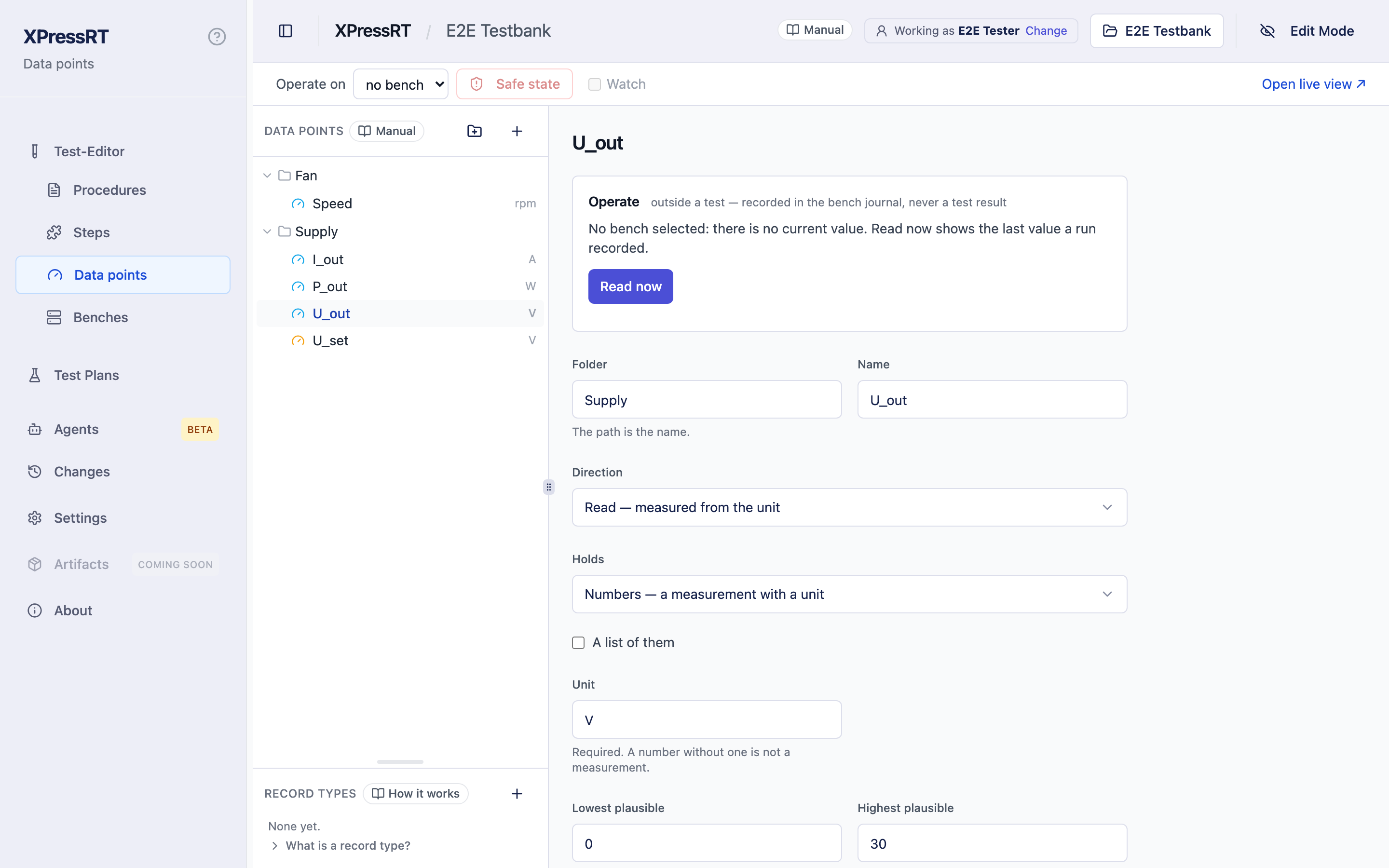
A data point is a named quantity: Bench/Voltage/U_out, read from the unit,
in volts.
Why the detour instead of writing the value into the step? Because a step that talks to a particular instrument is chained to it. A data point breaks the chain: the step says what, the bench says with what. Today a person reads the value and types it in. Later an instrument reads it. The test case does not change.
How it fits together tells that as a week at a bench, and is the shortest way to see why this is worth a detour at all.
The catalogue
Open Test-Editor › Data points in the sidebar, beside Procedures and Steps — a data point is what a step reads or sets. The tree is yours to shape — folders and points, at any depth:
Bench › Voltage ›
U_out,U_setBench › Current ›I_loadClimate ›T_ambient
The full path is the name. Voltage/U and Current/U are two different
things, so every view shows the path.
Each point carries:
| Field | ||
|---|---|---|
| Folder and Name | required | Together the path: its place in the tree, and its identity. |
| Direction | required | Read — measured from the unit. Set — applied to the unit, and it stays. Request — something has to happen, once per call; see Requests. |
| Holds | required | Numbers — a measurement with a unit. Named values — a state, a switch position, an error code. On / off — a relay, a lamp, a switch. Text — a serial number, an identifier. |
| Unit | required for numbers | V, mA, °C, rpm. A number without a unit is not a measurement. Named values, on/off and text have none. |
| Longest, Form | optional, text only | The most characters a value may have, and a regular expression every value has to match as a whole — SN-[0-9]{6}. |
| Lowest plausible, Highest plausible | optional | The range: what the point can plausibly hold — an instrument range or a physical limit. |
| Clock | optional | Whose clock stamps a value when equipment answers, for example scope-1. Empty means nobody samples this point. |
| Resolution | optional | What that clock can tell apart: µs or ms, or Not stated. |
| Kind | optional | State (the default) — it holds a value, a mode, a fault that stands; a time check counts a change of it. Event — it reports, a request or a telegram; every report counts, also one that says the same as the last. |
| Derived from | optional | The points the bench computes this one from — an edge distance from a switch and a signal. The step then reads one number instead of asking a person. |
| Why this kind | optional | One line: why read, set or request — can be refused in Lasing, and the test must know. An assistant has to give it for a set point or a request. |
| Description | optional | Free text: what the point is and where it is taken. |
Clock, resolution and derived from describe a bench. Without one, a person answers, and the page stamps the value at the moment it is entered — so they can stay empty until equipment is connected.
The catalogue lives in datapoints.json and can be edited by hand. What is
written there is read, not silently taken: a file that cannot be read is
refused at the top of the page with its line and column, nothing in it is used,
and nothing is written over it until it reads again. A point that breaks a rule
— a numeric point without a unit, a type XPressRT does not know — is listed
there with the rule, and an assistant's list_data_points says the same.
The type of a point can change while no run has recorded it: numeric to named values, or back with a unit. Once a run recorded the point, its type stays — the recorded numbers keep the meaning they had; make a new point for the other kind.
The range is not a pass criterion
The range says what is possible, not what is acceptable. Two tests routinely accept different windows on the same point, so what counts as a pass belongs to the step, not to the data point. The range is used to refuse an impossible entry: 500 V typed into a 0 … 60 V point is a typo, and the dialog says so.
On/off and text
An on/off point is written on or off — true and false are taken too, in any case — in steps, variants tables and answers. 1, 0, yes and no are refused with that reason rather than guessed. The run records it as true or false, and the report shows on or off.
A text point holds the text as it is: 5,0 at a text point stays 5,0. With Longest and Form set, a value that is longer, or that does not match the form, is refused where it is typed — in the operator's dialog, in a fixed value of a step and in a variants cell.
Neither has a unit, a range or an order: limits, a mean and a chart belong to numbers.
Records and lists
Some things a test speaks about are not one value but several that belong together: a message sent over a bus, a report a service receives, a bundle of settings. Such a thing is a record — named fields, each with its type.
A record is described once, as a record type, under Record types on the left of the Data points page: a name (ErrorReport) and its fields. The grip between the list of data points and Record types moves the line between them; the page keeps where you put it.
| A field is | With |
|---|---|
| a number | unit, and a range if it has one — or no unit, on purpose |
| named values | the names |
| on/off | — |
| a text | longest and form, if wanted |
| a record | the name of another record type |
A number in a message is often no measurement: an error code, a quantity of items, an identifier. Such a field is ticked no unit — a choice, not a field left empty: a number field with neither a unit nor that tick is refused. Do not invent a unit like code for it. A data point and a parameter of a request still need their unit.
Any field can be a list of them, of free length or with a most. A field with a default may be left out by whoever sends the record. Records go inside each other at most three levels deep, and never in a circle.
Data points then name the type instead of listing the fields again:
- a read or set point holds a record: Holds → Record, and its record type. A point that reports messages is of the kind Event — every report counts;
- a request sends one: instead of its own parameters it takes the fields of a record type, and a call gives them by name. A single parameter of a request can be a record or a list as well.
And any read or set point can hold a list of them instead of one value — several readings, a list of fault entries.
What a test then says is values, not a text on the wire: the bus sends visbox stop with result isOkay, the error service receives code 4711. How the fields become JSON, a frame or a telegram belongs to the bench.
A block or Python step reads a record as a whole or one field of it —
ErrorService/Received:code, up to three fields deep —, sets one as a bundle
and calls a request with its fields by name. See
Records and lists in the guide to blocks.
A form step works on a record field by field as well:
- Read data points on a record point shows a row per field under the point. Say what a field has to be, or — for a number — give it a min and a max. A field left alone is read and recorded, not judged. On a list point the step names the entry the list has to contain; for a list of records, the fields that entry is recognised by.
- Set data points on a record point takes the value field by field. Leave every field empty and the operator is asked what to set — as with a number. A record half filled in is not saved.
- Request shows the fields of the type as the request's parameters, and a parameter that is a record as a row per field. The entries of a list are fixed in the step.
Wherever a single value stands, a parameter of the sentence can stand instead
— written as in the sentence, {severity}. In a variants table that is a
column per field, and a cell has to hold what its field holds: one of the
field's names, on or off, a number. A value that does not fit its field is
refused when the step is saved, with the field, what was expected and what
came.
Without a bench the operator serves such a point, in the same dialog as any reading — see What the operator sees. The report shows a record as a table of its fields (Records in the report). A whole example — a message sent, its confirmation counted — is in A message, end to end.
In the instruction of a request a parameter that is a record reads as its fields: Send the message {message} becomes Send the message visbox = stop, result = isOkay. The same fields stand in the table beside it.
Not yet
A bench cannot be bound to a record or a list yet: in a run the operator
serves it. A form step checks single-valued fields; what a list field
of a record holds is checked in a block (CHECK_CONTAINS, COUNT).
Changing a record type is allowed also where it is used. The page shows where — Used by — before it writes, and the points and requests that name the type take the change with them. What no longer fits afterwards is said when the steps are built, with the place; a recorded run keeps what held when it ran. Renaming a type carries along everything that names it, in one write. A type that is still used cannot be deleted, and a field an operator instruction still names cannot be removed — both say what is in the way.
Renaming a field, or a named value of a field, carries along what names it:
the block files — the field behind a colon, the key of a bundle, the name of a
request's value, the text of a value where it stands against that field — and
the instructions of requests that take the type's fields ({field}). Change
the name in the form and save. Before anything is written the page lists what
it will rewrite, and what it will not: Python somebody wrote by hand is listed
with its lines, never rewritten. It is one write — the catalogue, the block
files and the steps built from them, or nothing. Only places that are known to
mean this record type are rewritten; the same word in a note, a variable or
another type stays.
A named value also stands in test cases: where a step's sentence carries it — the bus sends visbox stop — or a column of a variants table does. Those lines go along with the rename, in the same write, exactly where the step gives that parameter of its sentence to this field; the same word in another column or another sentence stays and is listed. Check the procedure names a test case that gives a field a value it does not know, with the line — in a run such a step fails, and its sentence says that the test case is the reason, not the unit.
A recorded run keeps the names it recorded. That matters for a named value: in a record a state is recorded by its name, with no number behind it, so a run from before the rename says the old name and a run after it the new one.
Because the colon reads a field of a record, a name cannot contain ":" — neither a data point nor a folder.
datapoints.json keeps the record types under types. It is written as
version 3 only when it holds a record type, a record or a list; a workspace
without them keeps its file exactly as it was.
Reading a point
A Read data points step names one or more points and what is expected of each:
- Readings — how many readings to ask for. One by default.
- Seconds between — the spacing of those readings. It only means something with more than one reading: it is what makes a series a series rather than the same number typed twice.
-
Criterion — one of:
- nothing — leave all limits empty, and the value is recorded, not judged. Such a step cannot fail.
- within limits — a Min and a Max, set on the step.
- reference and tolerance — a Reference and a Tolerance, absolute or with Tolerance in % ticked. The same statement, written the way a test specification usually states it.
Min and max cannot be combined with reference and tolerance on the same reading: that would be two criteria for one value, and nothing would say which one held. - Judge the mean — with several readings, the mean is judged instead of each single reading.
At the bench, the operator sees the step's message and one field per point, labelled with its path and unit.
At an on/off point, Has to be is on or off. At a text point it is the text, and How says how the reading is held against it: is (the whole text, upper and lower case counting), contains, or matches the form (a regular expression the whole text has to match). Min, max, reference and tolerance are not offered there.
Every number in the table has to be a number or a parameter from the step
sentence, or empty. A number has one decimal mark, a point or a comma — 5.0
and 5,0 are the same five everywhere, in the form, the dialog, a variants
cell and a block step. There is no thousands separator: 1.234,5 is refused
with that reason, not guessed. Anything else is red where it was typed, and
the step cannot be saved until it is corrected; Readings is a whole number,
at least 1.
Setting a point
A Set data points step names what to apply:
- Set to — the value to set. Leave it empty and the operator is asked what to set — the rule everywhere here: a field with neither a fixed value nor a parameter is a question for the person running the test. The field says so while it is empty.
- Record what was reached — optional. You dial 5.00 and get 4.98; where that matters, the operator types what was actually reached and it is recorded beside the target. Where the two differ, the report and the live log say so as a warning — set QCW, reached CW —; the step still passes.
When it took effect. A set value is stamped with the moment it took effect,
by whoever knows it: the bench, with its clock, once one answers; without a
bench, the moment the operator confirmed the setting (clock entered), or the
moment XPressRT sent it (runner). In a dry run an assistant answers, the
stamp is simulated. A time check measured from such a moment says which it
was — see Time has a reference.
Requests
Some things a test needs are neither a value to read nor one to set: bring the unit into Ready, run the self test, power up. They have to happen — once per call, with their parameters together — and they can be refused or fail. Such a data point has the direction Request.
Which kind a point is, three questions decide, in this order:
- Does the test only want to know what is? → Read.
- Should something happen that has an end and an outcome? Any one of these is enough: doing it twice should do it twice (a self test, a reset); it can be refused or fail, and the test must know; several values belong together and only act together (a state and a ramp); it takes time and ends. → Request.
- Should something be so and stay so until it is set otherwise? Setting it twice changes nothing. → Set.
Pressing a pedal is a set point even when a test case uses it as its trigger: trigger is a role in a test case, not a kind of point.
A request holds no value, so it has no type, unit or range. Instead it carries:
| Field | ||
|---|---|---|
| Parameters | optional | Each with a name, a type — number (with unit and range), named values, on/off or text — and, where it has one, a default. With a default a parameter is optional; without one, every call has to give it. Only what a test wants to decide belongs here. |
| Instruction for the operator | required | What a person does when no bench carries it out — Bring the unit into {state}. {name} stands for a parameter's value alone — write the unit after it, as in a step sentence: wait up to {duration} s. The page shows it as the operator will read it, with the defaults filled in. |
| Pictures | optional | Files in the workspace that go with the instruction. |
| Safe state | optional | What the request changes about the safe state — allows emission. Empty means none. |
A request answers ok, failed, refused, timeout or aborted —
never a value. What it did, a read point says: a step that brings the unit to
Ready checks System/State afterwards.
In a step. The step action Request chooses the request and, per
parameter, where its value comes from: the sentence ({state}), a fixed value,
or its default. The Verdict has three choices:
- passes on ok — the default;
- passes on ok or refused — for a step a refusal suits as well;
- passes only when refused (negative test) — for a requirement of the kind Lasing must not be possible from Standby. Accepted, the step fails with System/BringToState was accepted, but this step demands a refusal. With ok or refused such a test could never fail.
In all three, timeout and aborted are an abort by the bench, not a result.
There is no sets a mark field: like every set and
read step, a request step marks itself — with the moment the request was
accepted. Blocks call a request with REQUEST — see
Requests.
Without a bench a person carries it out. The dialog shows the request, the step and test case, the parameters with default where one was left out, the instruction with the values in it and its pictures — and three buttons, Done, Failed and Not possible. There is no text field; the message is made from the choice, and Enter and Escape answer nothing. Failed and Not possible bring the defect report, unless the step turns it off. In a dry run the assistant answers, and the record says simulated.
In the record. Every call stands in series.json with its parameters, its
status, when it was accepted and completed, the clock and who carried it out;
the report shows a block per call under its step — Request · Params ·
Executed operator · “Done” · name · Accepted = Completed · clock entered. A
request is no reading and is not in measurements.json.
Who serves a data point
Every step that reads, sets or calls a request — a form step, a block, Python — asks one place who serves the point. Without a bench:
| Who | In the record | |
|---|---|---|
| a read, from any step | the operator | executor operator — in a dry run simulated |
| a set from a form step | the operator, who sets it | executor operator |
| a set from a block or Python | nobody | executor none — the report says not applied — no bench |
| a request | the operator, from the instruction | executor operator |
When a bench is connected, this is the place where it takes over, for every kind of step at once. If it does not answer ok, the step is aborted by the bench, not failed — see Aborted by the bench.
When nobody answers
The dialog counts down five minutes. When the time runs out, that is not an answer: a reading or setting step fails, the way its If it fails setting says, with nobody answered in time. It no longer sends whatever stood in the dialog, which for a setting with no target used to mean the step passed with nothing recorded.
Courses over time
A block step can also take more than one value at a time. READ_SERIES asks
for a number of readings, one after the other. COLLECT takes everything that
arrives for a point within a window, and WAIT_UNTIL waits for an edge — both
need something pushing samples at them. With no bench connected, nothing does,
so the run asks for the course instead: a set of values, each with how many
milliseconds after the start it arrived. Where the check measures from a mark
(since = AT(…)), the milliseconds count from that mark — the dialog says
so —, so a window of half a second after a trigger holds what was stated for
it, however long the answer took. How that works at the bench is in
Running a test.
Every one of those values lands in series.json, with its time stamp, whose
clock stamped it and where it came from — see
Reports and records.
Operating without a test
On the Data points page you can read, set and call a point without a test case running — to see whether a bench answers, to bring a unit into a state by hand, to try a request before a step uses it.
Choose the bench under Operate on, at the top of the page; open a point, and its section Operate offers what the point is for:
| Point | What you do | Without a bench |
|---|---|---|
| read | Read now shows the value with its time stamp, the clock and who served it | There is no current value. Read now shows the last value a run recorded, and says so: the run, the time, where it came from — and simulated — not evidence when it came from a dry run or a simulated bench |
| set | Set, with an input for the type: a number with its unit and range, on/off, a name from the list, text | Not possible: no bench selected |
| request | Run, with the parameters as in the form — defaults shown, required ones empty —, then the answer: status, code, message, accepted and completed | Not possible |
This works on hardware without a test around it, so there are rules:
- Only through the bench and its binding. A point the bench does not bind, a disabled row and a disabled driver cannot be operated; the page says why.
- Not while a run is going on the same bench — in this window or in another. Set and Run are locked and say so; Read now still works. The window with the run reports it every 2 seconds; when it has been silent for 7 seconds — closed, crashed — the lock is gone.
- Type and range are checked as in a form step. There is no free text except for a text point.
- A request that can change the safe state asks again, with the text of its effect, before it is run.
- Everything is recorded in the bench journal: who, when, which point, which value or parameters, which answer — see The bench journal. It is not a test result and never counts as evidence.
- An assistant has no tool for it. Operating outside a test is done by a person.
Safe state, beside the bench, calls safe_state on every driver of the
bench and shows what each answered. It is not locked while a run is going:
bringing a bench into its safe state must never wait for a lock. A run that
was going on that bench then says so in its report — see
A safe state by hand during a run.
Watch, beside it, reads every point the bench serves once a second and shows the values in the live view — without a run. It is no test and no operation: nothing of it is in a run, and nothing in the bench journal. While a run is going on the same bench it rests, because the run then publishes what it reads itself, and goes on by itself afterwards. The switch belongs to the window: it stays on while you move through the application and is off after a reload.
Before a request is run it is checked completely — type, range, the lock —, and only then are you asked to confirm an effect on the safe state. The confirmation and the answer show what goes to the bench, and which of those values the binding fixes; one that can affect the result is set apart.
What you set by hand on a simulated bench is read back afterwards — in this window, until you reload the page; then the bench is what it declares again. A run always starts from what the bench declares, not from what somebody set by hand before it. A real bench can be operated by hand once its driver is connected.
Everything you do here passes the same place as a step of a run, so it shows up in the live view as it happens.
Watching the data points
Open live view ↗, at the top of the Data points page, shows what passes the data points as it happens, in a window of its own: a chart for numbers and switches, a log for everything else. What it shows is what the run records — see Live view.
Renaming, turning round and deleting
Steps name a data point by its path, so changing the path reaches into steps. XPressRT asks first, and names what the change would touch:
- Rename this data point? — the steps that use it. Generated steps are rewritten to the new path; a step whose code somebody edited by hand is left alone and listed, because the name in it has to be brought over by hand. Go ahead or Leave it.
- Turn this data point round? — asked when you change the direction of a point that steps already use the other way. Those steps are not rewritten: a step that reads and one that sets are different steps. Until they are changed, running them stops with the data point named. Turn it round anyway or Leave it.
- Delete this data point? — the steps that use it. They keep the name and find nothing behind it. Delete anyway or Leave it.
Renaming or deleting a folder asks the same, for every point under it.
A test case can name the point itself, when a step takes it from its sentence —
READ(POINT(punkt)) with the Bench/U is in range, or a variants column of
paths. A rename rewrites those lines and cells too. Where the path is built
from a pattern — POINT("Laser/Diode/T{n}") with n = 3 — the value is not
rewritten, because it may steer more than the path; the rename lists those test
cases instead, to be changed by hand.
A generated step file with such a POINT carries the points its pattern can
reach — with their named values, so that a name from the test case becomes its
number — and no others. A new data point under Laser/Diode/ is taken into
that file when it is created; a new data point anywhere else leaves the file
as it is. Only where the point comes from a variable, with no pattern to read,
the file carries the whole catalogue.
The count is of steps, not of mentions: a step that names two points of a folder is one step. A block step whose sentence no longer has a step in XPressRT is still named, so a rename carries it along — but it never runs, and it does not keep an assistant from deleting the point.
A point a bench binds is asked about once more, before any of these: Bound on a bench lists every bench whose binding the change reaches, with what its check would say afterwards. A new path, a folder that moves, or a name of a state that keeps its number can be carried along — ticked by default; the row then follows the point. A new unit, an added value or another type cannot: what the bench reports for it is known only at the bench. A row that is not carried along, or does not fit any more, leaves the bench needing attention, and no run starts on it until the row is fixed on the Benches page — there a row whose point is gone can be moved to the point it was renamed to.
If a step names a point that has been deleted, or uses one the wrong way round,
you are told before the run: in the test case view, a Read data points or
Set data points step is marked in red with the reason, and an assistant's
check_procedure reports it for every step of the procedure, block steps
included.
Values from the variants table
A variants cell has to be what its column feeds: a number, a name of the
point, on or off, or a text that fits the point's length and form. The
test case editor offers a choice for a column that feeds named values or
on/off, marks a cell that does not fit, and does not save it; an assistant's
create_test_case, update_test_case and import_plan refuse it with row,
column and reason, and check_procedure lists it.
A cell that got into a file anyway is handled when the run starts. A number that is not one, or a text that does not fit, keeps the run from starting. A name the point does not hold, or something other than on or off for a switch, does not: that row is not run, the others are, and the run says that the mistake is in the test case. The same holds for a value written in the sentence of a test case, and for block steps. See Running tests.
Every number in a step — a target, a limit, a reference, a tolerance — can be a placeholder instead of a fixed value. The variants table then fills it in per row, and one test case tests three operating points:
| u_set | u_expect | tolerance |
|---|---|---|
| 3.3 | 3.3 | 0.1 |
| 5.0 | 5.0 | 0.1 |
The step reads the supply is set to {u_set} volts and the output is {u_expect} plus or minus {tolerance}. Written once, judged three times, and each row appears in the report with the values it was tested at.
What the record shows
A record is recorded as it arrived. In series.json its value is an object
with the fields in the order of the type — a field with named values by its
name, on/off as true and false —, and the entry names the type (record_type),
the unit of every number field as it was in that run (units, by field) and
list where the point holds a list. A request called with a record says which
type gave its parameters. A point that holds no record is recorded as before,
and the file keeps its version. Where a step read one field, what it read
stands under Point:field, and everything that looks the path up — the plan
report, the Run Viewer, the Live view, an assistant reading the run — takes it
back to the point.
Every reading lands in the report under the step that took it: the path, the value with its unit, the limits it was judged against, the outcome, and who entered it — operator for a person at the bench, assistant when an assistant answered the dialog. They are not the same evidence, and the record keeps them apart. With a repeat, the mean is shown beside the values and, where there is enough to plot, a chart of the readings.
Where the same point is read against the same limits in more than one test case, the report draws one chart across them — that is the question a test report is actually opened for: does the unit drift, and where does it leave its window. Readings against different limits are not drawn together: a line between those would say something that is not true.