Reports and records
Every run writes its own record into your workspace. Nothing is uploaded anywhere: what a run produces stays on the machine you tested on.
Where to look
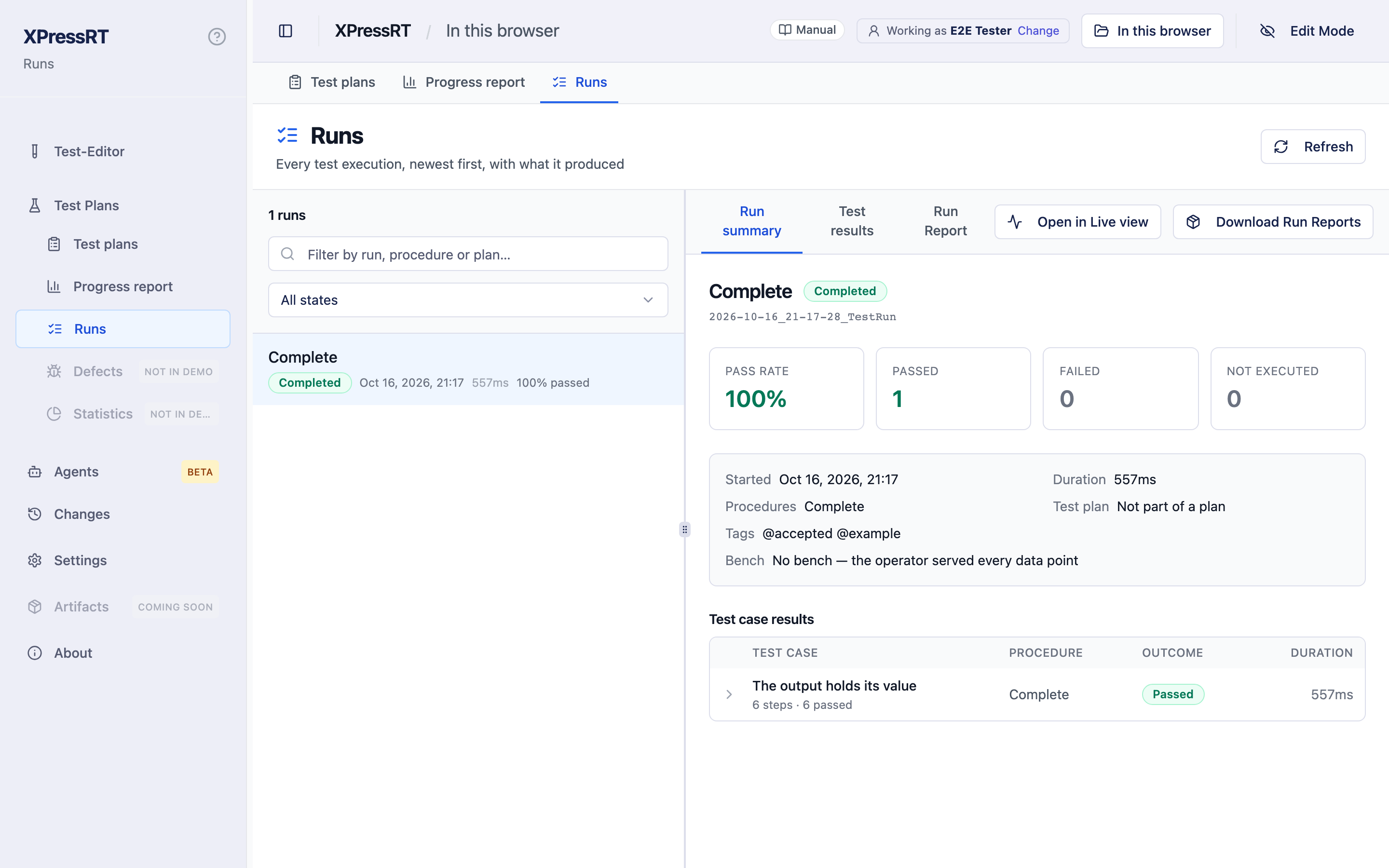
Test Plans › Runs lists every run, newest first, with what it produced. Pick one and you get three views:
- Run summary — the run as a whole: device under test, version, tester, test place, serial numbers, and how the procedures went. Anything somebody noted while the run went on is collected under What was noted while this ran, with the procedure, test case and step it belongs to.
- Test results — a table of test cases with their steps, filterable down to the failures. Under a step, n values opens what went through the data points in it — see Who served a value. The name of a test case opens it in the editor, so you can see what it does without looking for it in the tree. A test case counts what actually ran: its own steps and the preparation and clean-up around it, each marked with which of the four it is. What runs around the whole procedure stands above the table under Around the procedure, because it belongs to no single test case — and anything that failed there is shown first, with the step and the reason.
- Run Report — the report itself, page by page.
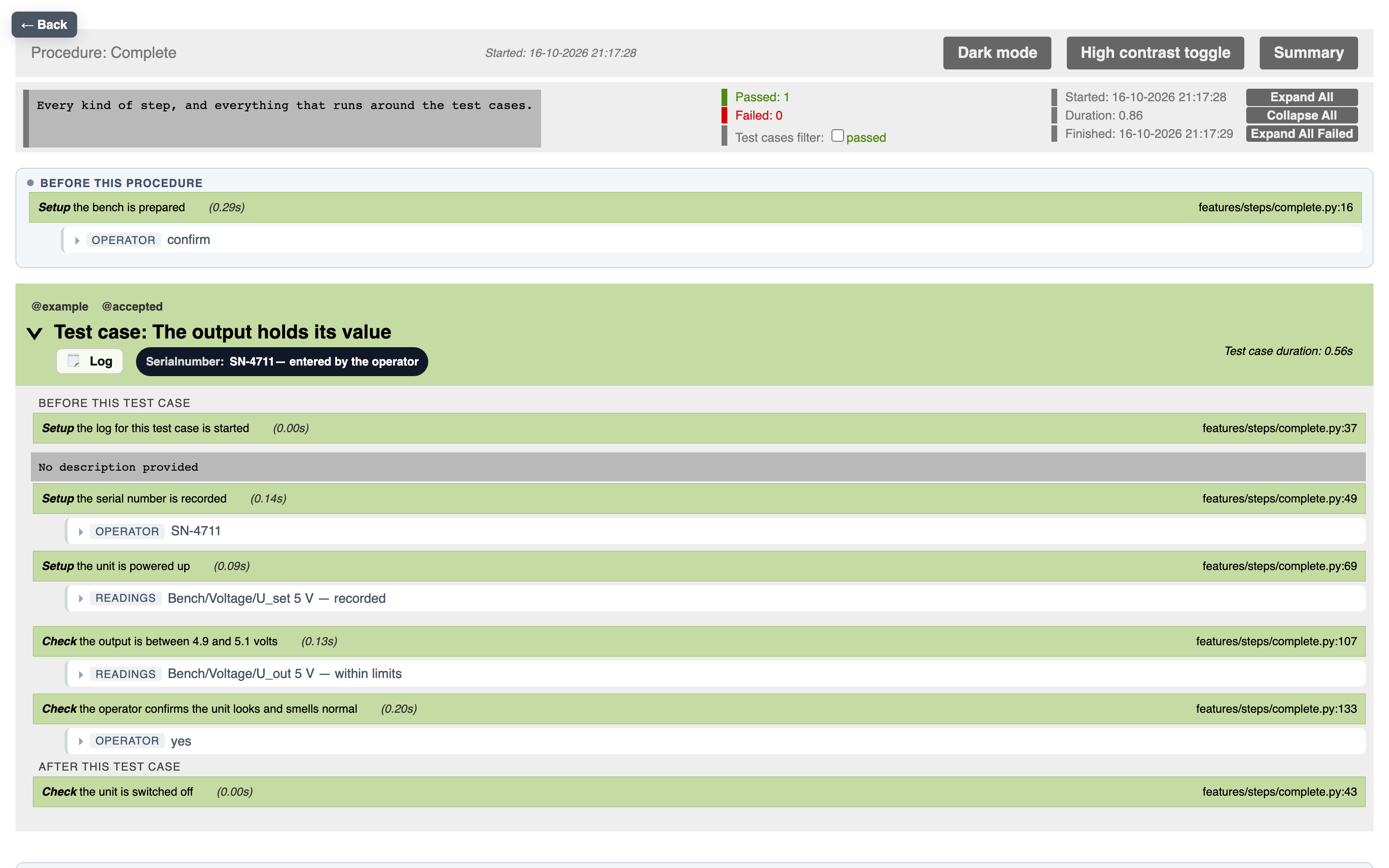
The report of a procedure
The report reads in the order the run happened.
- Before this procedure — what was done to set the bench up, as its own block at the top.
- Each test case — its steps with their outcome, the preparation and the
clean-up of that test case inside it, and everything the operator recorded
hanging under the step it belongs to:
- the question that was asked and the answer that was given
- anything the operator wrote
- a defect or proof report, folded, with a link to the full page
- the readings, folded, with a line that says the outcome without opening
them:
Bench/Voltage/U_out 5 V — within limits
- After this procedure — what was done to put the bench back.
A test case with variants appears once per row, each with its own outcome and its own parameters.
Who served a value
Every value in a report says who served it, by whose clock, and where it came from — so that an auditor sees what a device measured and what a person confirmed.
- Readings carry three columns: Served by, Clock and Origin. A bench
reads as
device · HIL-02 / dut— the bench and the driver that answered —, a simulated bench assimulated · SIM-1 / dut, a person asoperatorwith the clockentered. An assistant answering a dry run readssimulated (dry run): that is not a bench. - A set says the same, and for a set the bench ran as a command also the command, what was sent and the fixed values.
- A request has its own block. Executed names the bench, the driver, the
command and what the bench answered —
device · HIL-02 / dut · SetSystemMode
  → DONE
—, or the operator with the answer chosen. Sent is what went to the bench, after translation and scale. Fixed lists the values the binding set on its own, each with its kind. - A fixed value that affects the result is set apart:
ramp_ms = 0 (affects
  result)
. It is a test condition no test case states. See Benches. - Disabled on the bench: where the run's bench had a point or its driver
switched off, the line at the step says so with the reason —
operator —
  disabled on SIM-1: sensor not wired
. The top of the report, the run summary page and the Run Viewer list everything that was disabled and say for each point what really happened in this run: the operator served it where somebody was asked, nobody applied it where a block or Python step set the point — such a step asks nobody, see Benches —, or it was not used in this run. - A state by its name: a point with named values shows the name and the
number it stands for,
pressed (1), also where the bench set it. The name is the one recorded with the run. - Aborted by the bench names the bench and the driver. When the bench answered failed, the time and the clock are the bench's; after a timeout they are the runner's, because the bench did not answer.
The Run Viewer shows the same under each step, folded: 3 values · SIM-1 / dut, operator. Open it for the table — data point, value, served by, clock, origin and time. Three things show without opening it, each as a small mark on the step: a fixed value that affects the result, a point that was disabled on the bench, and a step the bench aborted. The Run summary names the bench of the run, the version of its binding and whether that binding was commissioned. A test case the bench aborted counts its steps as 3 passed · 1 aborted by the bench · 1 not reached: the aborted step was reached.
All of it is read from the run itself (series.json and run.json), never
from today's binding: a report keeps saying what it said when the bench is
rebound next month. The assistant's explain_run reads the same files and says
the same, fixed values included.
A run from before version 2.3 knows the bench and, from the clock, the driver; the command and the fixed values were not recorded then and are not shown.
Serial numbers and who gave them
A serial number identifies the unit, so the record says where it came from. Beside each number, in the run summary and on the page of the procedure:
| Badge | Means |
|---|---|
| entered by the operator | typed into the dialog at the bench |
| set by the assistant | answered by an assistant, not by a person |
| given when the run was started | handed over with the start of the run |
The same number from two sources carries both. run.json holds the same under
serialNumberSources: for each number, the list of where it came from.
Notes on values
A note written beside an answer or a value is part of the record, not a comment
on the screen. It stays with the step on the page of the procedure, with the
value it belongs to in series.json and step-results.json, and in the run
summary. That is where somebody says what a number stands for — "datasheet
value, no instrument on the bench" — and without it the record says only that
a value was entered.
Stopped runs
A run that was stopped still writes its report, with whatever got through before the stop: the steps that passed, the values typed so far, the notes. The step it was stopped at says stopped by the operator, and what came after is not run — not failed. See Running a test.
Aborted by the bench
Every read, set and request goes through one place that decides who serves it — today the operator, in a dry run the simulation, later a bench. When that place does not answer ok, the step is aborted by the bench: nothing was judged, so it is not a failed check. The report says so at the step — Aborted by the bench, with the data point, what was asked and the answer —, the rest of the test case does not run, and no defect report is asked for. The run list counts the test case as Aborted, apart from passed and failed, and a test plan counts it as not run: it is to be repeated.
A request is different in one way: what the one who carried it out reported — failed, refused — is a result the step judges. Only no answer at all, a timeout, aborts it.
A set from a block or a Python step says who set it as well. Without a bench nobody does, and the report shows it as not applied — no bench rather than as set.
Not run because of the test case
A test case that names a value its point, switch or field does not know is not
run at all; see
Running tests.
The run list shows it as Not run with the sentence that says what stands
there and what exists, and it is counted under Not executed. The Run
summary lists these test cases in a section of their own, Not run, above
the failed and the passed procedures, with a tile that counts them; a procedure
of which nothing ran is not among the passed ones. An assistant's explain_run
lists them under Not run, each with its sentence.
In run.json they stand in notRun. Nothing is written about them into
step-results.json: a test case that was not run has no result.
A safe state by hand during a run
Safe state on the Data points page is never locked — also not while a run
is going on that bench. When somebody presses it then, the run knows: the
report says so under the step that was running, with the moment, who it was
and what each driver answered, and again at the top of the report and in the
run summary. The Run Viewer shows the same, and so does explain_run.
It is shown, not judged: the outcome of the test case is what it was. Whether a run that was touched this way still counts is for whoever reads the report to decide — the report makes sure they know.
Runs that did not start
A run in which no test case ran, and which only the run itself ended — stopped during the preparation, or the window or the browser runtime went away —, is listed as Did not start, with the reason. It has no result: it is neither passed nor failed; start it again. A preparation step that fails on its own, a bench that could not be set up, is still a failed run.
Charts
Where a step read a value several times, the report draws its readings under that step.
Where the same data point is read against the same limits in more than one test case, one chart across them is drawn before the clean-up of the procedure. Readings taken against different limits are not drawn together — a line between those would claim a trend that does not exist.
Records in the report
A record is shown as a table of its fields, never in one line: the field —
written as a block writes it, detail:severity, an entry of a list with its
number, history[2]:delay —, what it held, and its unit. The unit is the one
the run recorded beside the value, not today's catalogue.
- Where a form step said what fields have to be, that stands beside each of them, and a field that was something else is marked.
- A limit on one field is a line of its own under
Point:field, with the field's unit — a number like any other reading. - A record that was set shows what was to be set, and what was reached where the step recorded that.
- What a step collected over time — the occurrences of a message — is a table with a row per occurrence, the fields as columns, and for each its moment, who served it, the clock and where it came from.
- A request shows a parameter that is a record or a list as its own table.
The Run Viewer shows the same fields under values at the step.
Times and what they are measured from
"312 ms" says nothing without from where. Every time a block step judges carries it:
- A
RESULTof a time shows under its name what it was measured from — after "Trigger" = step 4 "the operator presses the start key" (clock bench-1/io): the mark, the step that set it, and the clock. - A check that fails over a time names it too: 312 is outside 0 … 200 (measured: 312 ms after "Trigger" = step 4 …).
- When the mark and the event were stamped by two different clocks, it says so; the time then carries whatever lies between them.
- When the mark or the event has no bench clock — the operator's confirmation, the runner, a dry run — it says not measured on a bench clock. Such a time never passes silently as a measurement.
- When nobody knew the state at the moment of the mark, it says state at the reference unknown — the first value after it is taken as the change.
- A check written without a reference says measured from the start of this step — no reference, and the run log has the same line.
How a reference is set is in Time has a reference.
Machine-readable output
Beside the report, every run writes these files into its folder:
| File | What it holds |
|---|---|
run.json |
the run itself: device under test and version, tester, test place, serial numbers and where each came from (serialNumberSources), suite and plan, whether it counts towards plans, start and end, and the bench it ran on with the version of its binding and what was disabled — null without a bench. An entry of disabled carries either only driver (a driver that was switched off) or point (a point that was not served; with driver as well when it was its driver that was switched off), each with its reason. notRun is there only when the run left test cases out because they name a value that does not exist: one entry per test case or variants row, with feature, scenario (the name the run's files give it), testCase, row (or null) and reason. The file stays version 2 |
measurements.json |
what the Read data points and Set data points steps recorded: every value with its unit, the limits or reference it was judged against, the outcome, source — operator or assistant —, and executor, who served it (operator, simulated, later device) with the status of the seam. A reading of a record point is type: "record": its value is an object with the fields, with record_type and units (the unit of each number field, by field path) as they were in this run, and in expected the fields it had to hold like that (expect_mode: "equals"). A limit on one field is a number reading of its own, under Point:field, with record_type. A list point is type: "list", with the entry it had to contain in expected and expect_mode: "contains". The version of the file stays 3 |
series.json |
every value that went through a data point, one line each, with its time stamp; clock says whose clock stamped it (a bench clock such as bench-1/io, or device, entered, runner, simulated), origin where the value came from (measured, operator, assistant, set, derived), and executor and status who served it — none for a set nobody applied. Every line has both, also every sample of a course; an access the seam did not answer ok stands with its status and no value (value: null) and never counts as a measured value. Since version 4 a line a bench served names it: bench and driver, and where the bench ran a command also command, sent (what went to the bench, after translation and scale, fixed values included) and fixed (each fixed value with name, value and kind). Without a bench these five are absent. A number of a point with named values also carries name, the name it stood for in this run. Stamps XPressRT makes itself end in Z; an access that timed out carries the clock runner. Beside entries a run may have events — what is no value and still happened in it: every mark, the start of every step, the start and end of every test case, and a safe state called by hand while the run was going, each with its moment, its clock and where in the run it was, in the order of their moments. A run without the list has no events; that is every run made before this |
step-results.json |
what block and Python steps recorded with RESULT or result(), with limits where they gave some, and for a time measured_from — and the values typed into them, each with enteredBy; under outcomes, every step aborted by the bench, with its cause and what the seam said |
hooks.json |
the preparation and clean-up steps, and how each one ended |
<procedure>.json |
behave's own record of the procedure: test cases, steps, outcomes |
<procedure>.html |
the report of the procedure, as described above |
run-summary.html |
the run summary |
TESTS-*.xml |
test results in JUnit format, the one build servers and test dashboards read |
A value in measurements.json or series.json keeps the unit and limits it
was taken under. Renaming a data point or widening a limit later does not
change what a finished run says.
A number a block step puts into a text — a result name like below {limit} W
— is rounded the way the report rounds: 11.4, not 11.399999999999999.
The files are there so that you can count, aggregate and archive without anybody having to open a report page and read it off the screen.
Pictures beside an answer
Pictures the operator attached to an answer stand under the step. With a form
step they are in the operator's note, next to what was asked and answered —
small, and enlarged on a click — and the files are in the run's attachments
folder. With a block or Python step they are attachments of the step, captioned
with what was asked.
Defect and proof pages
A report the operator filed becomes a page of its own, linked from the step it belongs to and from the summary. It carries what was written, the pictures that were attached, and which step, test case and procedure it came from.
Downloading a run
Download Run Reports in the run view packs one run — reports, readings and raw output — into a single archive to hand on or to file.