Plans and suites
Two different things, and the difference is worth keeping:
- A suite is a set of tests. It can be run at any time, it can be part of any number of plans, and it has no state of its own.
- A plan is a statement about a release: this is what has to be tested, and this is how far we are. A plan has a cycle and carries an outcome.
Suites
A suite is defined by a tag. Every test case carrying @Sicht is in the suite
Sicht — membership is a label on the test case itself, not a list kept
somewhere else that can drift out of step with it.
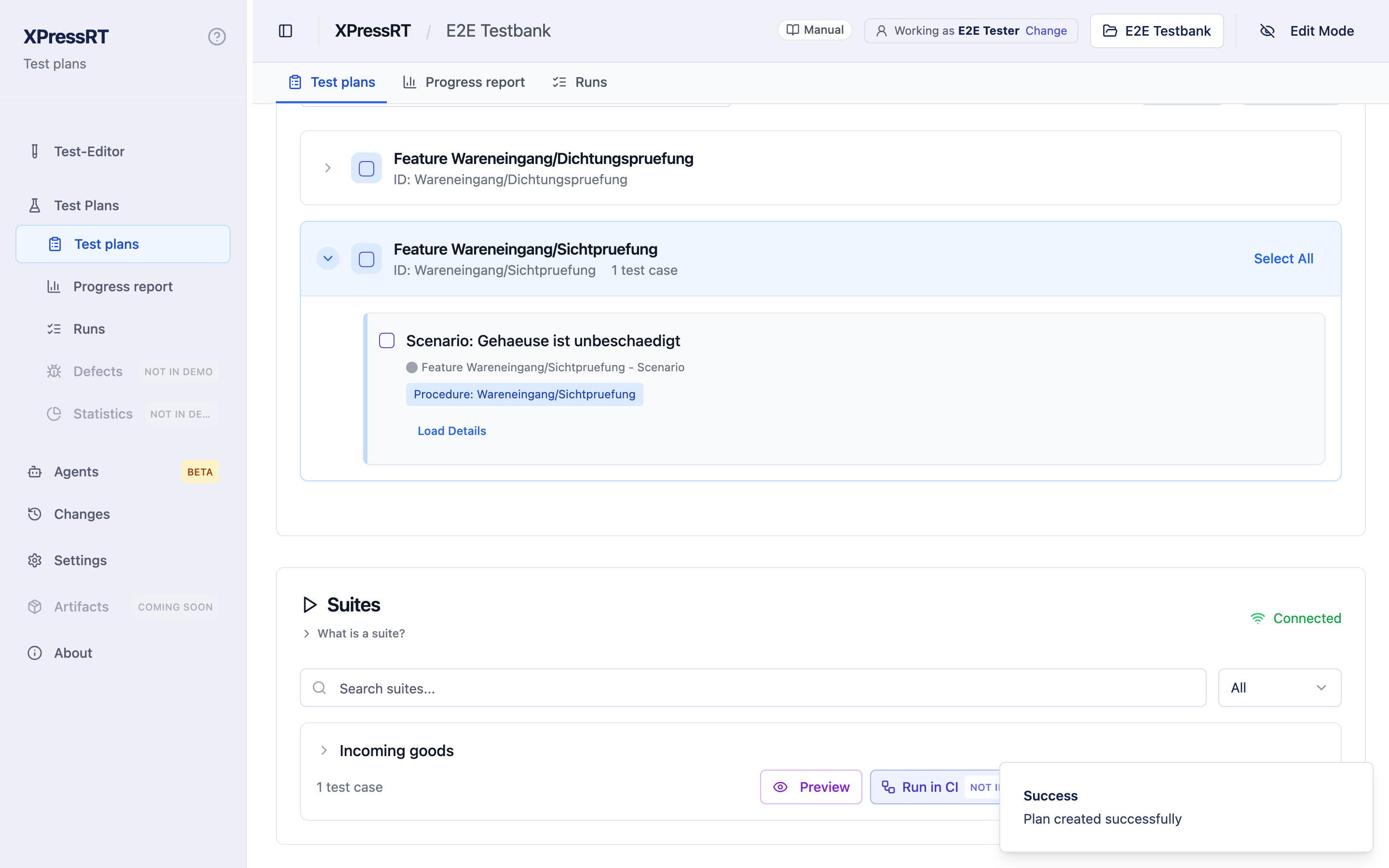
Create suite lets you pick test cases from the tree; saving writes the tag to each of them. Editing a suite writes the whole membership again, so the dialog always shows what is in it first.
From a suite you can Preview what it contains, Run it, Edit it or delete it. Deleting a suite removes its tag; the test cases stay. The greyed icon beside Edit, Run in CI (not in demo), does nothing in the demo.
Edit also changes the suite's description, under What this suite is. A suite whose contents you rebuild should not keep a sentence that described what it used to hold.
A suite shows no passed or failed of its own — that is a statement a plan makes, not a set of tests. The one state it shows is Running, while it runs, and it cannot be edited then.
Plans
New plan asks what the plan has to cover: whole suites, single procedures, individual test cases, in any mix. What you pick keeps its own identity — a test case can be in several plans.
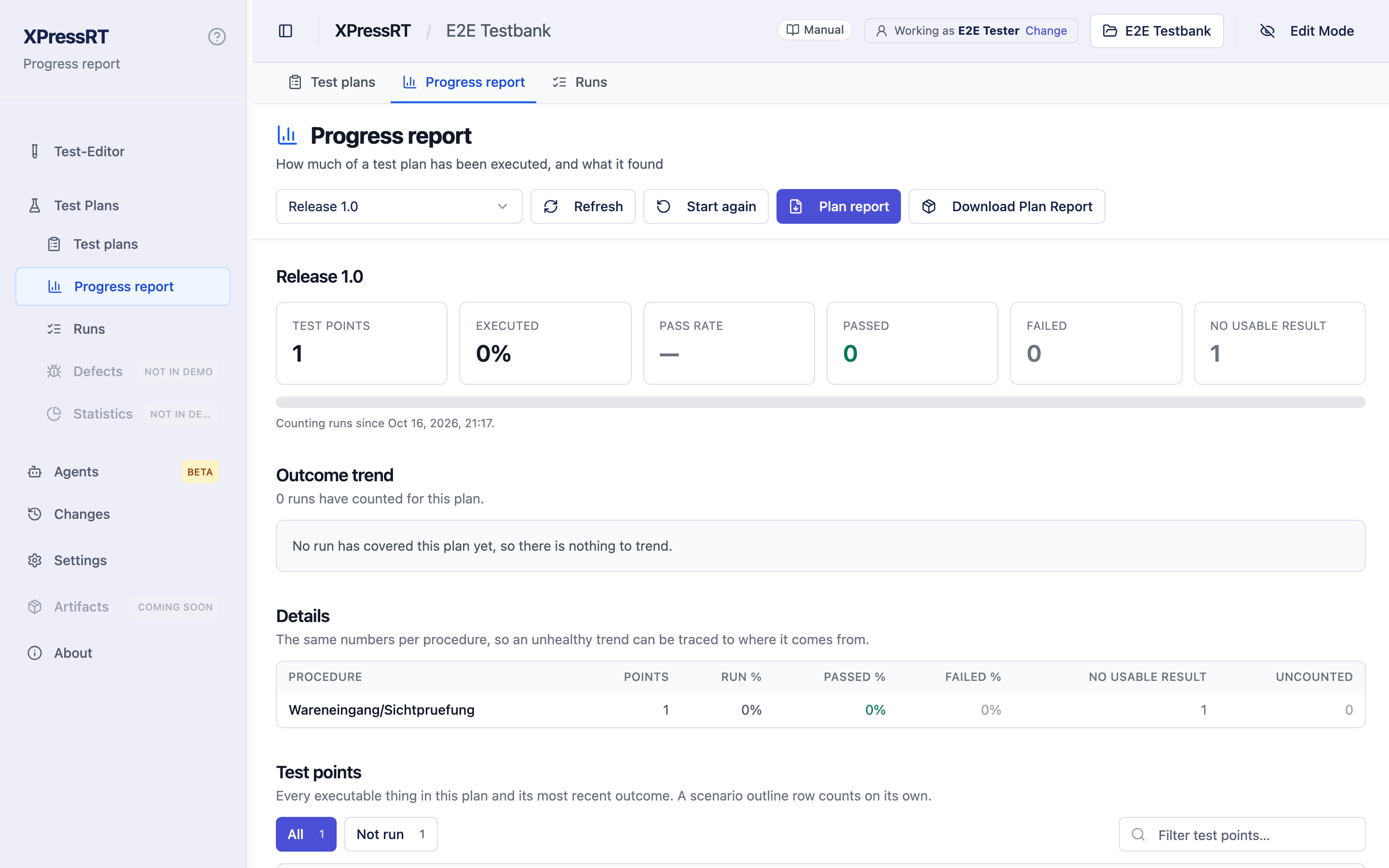
The plan's progress shows, per test point:
- its outcome from the runs that count towards this plan
- when it was last run, and by which run
- the tags it carries
- a Start button that opens the test in the executor
Not run is a state of its own, and deliberately not the same as failed: it says nobody has tested this yet.
A plan itself is not run. There is no button for it, because a plan is a statement about tests, not a set of them: you run its suites, or start its test cases from the progress view, and the runs count towards the plan. The greyed icon left of a plan's Edit, Run in CI (not in demo), does nothing in the demo.
The trend in the progress view shows how the numbers moved from run to run. With only one run counted so far there is nothing to draw a line through, so instead of an empty chart it says so, with that run's figures and a link to it.
When a result stops counting
A test point can read Outdated. That is not "not run": it ran, the result is still there, and you can open the run and read it. What changed is the test case. A step was renamed, a step was added, the order moved — and a result measured against the earlier version of a test says nothing about the version you have now. So the point stops claiming an outcome and says Outdated instead.
This is the single most common surprise on this page, and it looks like a defect until you know it: you renamed one step, and every result from before that moment went pale.
Two things follow from it, and both are on purpose:
- Nothing is lost. The run, its report and its readings stay as they were. Click the point, or the step in the trend, and you are looking at the run that passed.
- The plan does not quietly carry it. A plan that kept counting those results would be claiming that the test it names today has passed. It has not; its predecessor did.
The figure, the column and the grey band in the trend that sum these up are called No usable result, and that is exactly what they count — three different situations, all of which mean "this plan has no answer for that point right now":
| What it is | What to do about it |
|---|---|
| Not run — nobody has tested it | run it |
| Outdated — it ran, then the test case changed | decide whether to run it again, or accept the change as harmless |
| Blocked — it could not be reached, e.g. a preparation step failed | fix what stopped it |
They were called Not run together until somebody compared the trend with the plan report and found runs marked "not run" that had plainly passed. The name was the wrong half of that: the counting is right, the word was not.
And a fourth case, which is not in that number at all: a run that executed the test but did not count for this plan — started for another plan, marked a trial, measured against another version, or run before the cycle began. The point then says what happened underneath it: Executed 4 Sep 2026, 13:57 — passed, not counted for this plan: ran before this cycle began. The Uncounted column counts those.
Cycles
Starting a cycle says from here: only runs from this moment count. That is what makes a plan re-usable for the next release without losing what the last one recorded.
- Close cycle freezes the plan. From then on it answers from the snapshot taken at that moment — that is the point of closing it, and it is what makes a closed plan quotable.
- Start again opens a new cycle, and asks how:
- Start everything from scratch — every test point goes back to Not run. The one to pick when the unit under test has changed: a new firmware, a new revision, and no earlier result is about the same thing.
- Keep results whose test has not changed — a test point keeps its result unless its test case has been edited since it was measured. The one to pick when you reworked a few test cases and the unit is the same.
Nothing is deleted either way: the runs, their reports and any plan report you already produced stay exactly as they are.
A closed plan still lets you start a test case from it. Whoever looks at a finished plan is often exactly the person who wants to run one of its tests again to see something; the button says that the run will not change the plan's result.
The plan report
Download Plan Report writes the plan as a document: every test point with its outcome, and behind each result the runs it came from — with how each of them went. It is the answer to "what does this release rest on".
By bench lists the runs under the bench each of them ran on, with the
version of the binding, and no bench is the line for runs the operator
served alone. Passed, Failed and Aborted count test points by their
current result, exactly as the figures at the top of the report do, under the
bench of the run that result came from — so the columns add up to those
figures. What a run produced and no longer counts — a result a later run
replaced, or one taken against an older version of the test — stands in No
longer counted. The bench comes
from the run itself (run.json), not from today's settings, so two runs on two
benches stand under their own. Runs on a simulated bench count towards no plan
and are not in it. Where two benches fixed a value that affects the result
differently — ramp_ms is 0 on one and 50 on the other — a note under the
table says so: that can explain different results, and the value belongs into
the data point as a parameter.
About this plan names every tester and every test place the runs recorded, not the current settings; a plan that has not run yet shows the settings.
The runs are listed under Runs behind this result, each with its bench, its test place and its tester, folded away because a plan collects many of them over weeks. The heading says what is inside, such as 12 runs, 3 with no usable result, so folded is not hidden.
A run marked No usable result ran against an older version of the test: everything it measured belongs to a test case that has changed since. Its figures are still shown, because they are true, but they no longer count. A run that was merely followed by a newer run of the same test is not marked — it measured what it measured, and somebody measured it again.
Readings across these runs sums up the data points: per data point and unit, how many values, the mean, the lowest and the highest, and which runs they came from. It counts over the runs the plan counts and no others. A run with no usable result adds nothing to a mean; a run followed by a newer one still does. A data point read in two units is shown once per unit and never averaged into one number.
Coverage
The coverage view shows the plan against the procedure tree: which test cases are covered by it, which are not, and which tags they carry. A test case with variants counts as one entry — rows are results of that entry, not separate tests to cover.